Built for wedding and event photographers. Sudek finds the best shot in every burst, removes the garbage, and writes star ratings straight into Lightroom. Saves you hours of work.
Apple Silicon only · the license key unlocks unlimited photos and full model choice. Powered by your own Anthropic API key.
Write your preferences in plain language, by photo type — candids, portraits, action, atmosphere. "Everyone laughing → prefer. Someone on their phone → score down." Your rules layer on top of Sudek's built-in judgment. Save one preset per shoot type, reuse forever.
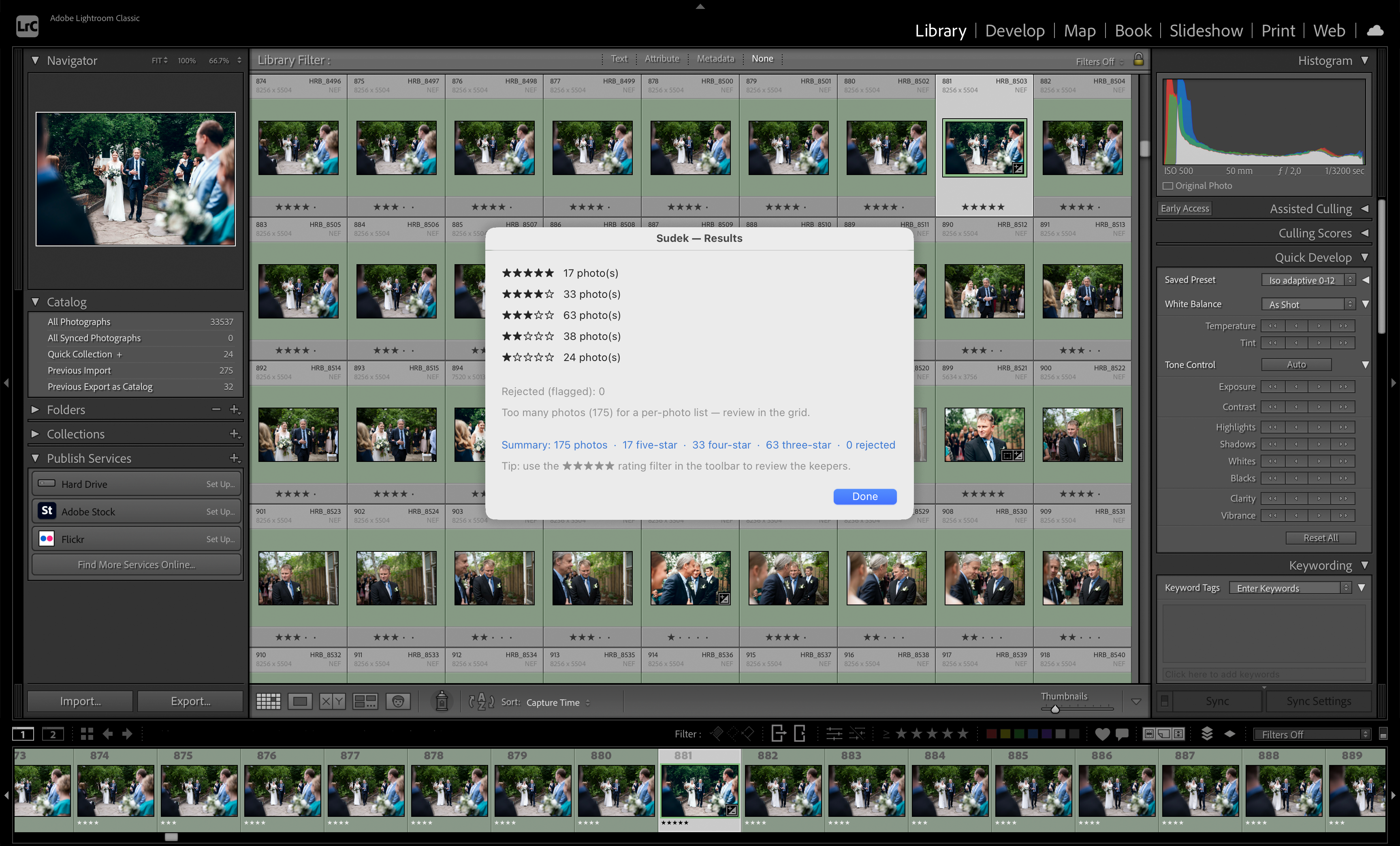
Select photos in Lightroom, launch Sudek from Plug-in Extras, choose your preset. Garbage frames are stripped locally, bursts are grouped, and Claude picks one winner per group.
Results are written back to Lightroom automatically. Filter by 4–5 stars and start editing. The better your preset, the less you'll want to change.
Most culling tools check sharpness. Sudek understands the moment — and follows your rules.
Every burst and near-duplicate sequence is grouped on your Mac. Claude compares the candidates and picks exactly one winner — the best frame, guaranteed.
Closed eyes, severe motion blur, bad exposure — filtered locally before any data leaves your Mac. Less noise for the AI, lower API costs for you.
Create presets per shoot type. Reward sharp eyes and genuine smiles; penalize blinks, grimaces, and motion blur. Your standards, applied consistently to every frame.
Each preset includes a free-text instruction to Claude. "The couple must always be in focus" or "prefer candid over posed." Plain language, precisely followed.
Candidates and their scores go to Claude, which makes the final comparative pick — the same AI used in serious professional tools.
Use fast, cheap Haiku for routine shoots or upgrade to Sonnet or Opus for weddings where every frame counts. You pay Anthropic directly — Sudek never marks up your API costs.
Download and try Sudek free — no license required. You'll need your own Anthropic API key to run the AI (free to create, pay only for what you use). The trial limits each session to 100 photos.
License key delivered instantly. Activate on up to 2 Macs.
macOS 12 or later. Requires M1 chip or newer (M2, M3, M4). Intel Macs are not supported in v1.
Adobe Lightroom Classic (not Lightroom CC). Any recent version. The plugin installs in under a minute.
A free account at platform.anthropic.com. Add a payment method and generate a key. You pay Anthropic directly — typically $1–15 per 1,000 photos. Sudek never marks up your API costs.
Use the Download free trial button on this page, or — after purchasing — use the download link in your confirmation email. Unzip the file: you'll find Sudek Server.app and the Sudek.lrplugin folder inside. The trial and licensed versions are the same app; your license key unlocks full features.
Drag Sudek Server.app to your /Applications folder. Open it — the Sudek icon appears in your Mac menu bar.
Click the Sudek icon in the menu bar and turn on Launch at login. Sudek starts automatically from now on.
In Lightroom Classic, go to File → Plug-in Manager → Add and select the Sudek.lrplugin folder. Click Done.
Go to platform.anthropic.com, create a free account, add a payment method, and generate an API key. The key looks like sk-ant-api03-…
In Lightroom, go to Library → Plug-in Extras → Sudek → Settings and paste your key. Stored securely in your Mac's Keychain — never leaves your machine.
Go to Library → Plug-in Extras → Sudek → Manage Presets and create a preset for your shoot type. Sudek sorts photos into five categories — Candids, Portrait / Group, Action, Atmosphere, Artistic — and you write plain-language rules for each: "Everyone laughing → rate up. Someone on their phone → rate down." Set reject gates (focus, exposure, blink) for hard cutoffs before any photo reaches the AI. Most photographers dial it in after 2–3 test shoots.
Select photos in Lightroom, go to Library → Plug-in Extras → Sudek → Cull selected, choose your preset, and let it run. Filter by 4–5 stars when done — your keepers are sorted.
one-time license fee — API costs billed separately by Anthropic
Requires Anthropic API key · Apple Silicon Mac · Lightroom Classic
Not ready yet? Download the free trial →