✦ AI photo culling for Lightroom Classic

From 3,000 shots
to your keepers
automatically.

Built for wedding and event photographers. Sudek finds the best shot in every burst, removes the garbage, and writes star ratings straight into Lightroom. Saves you hours of work.

Powered by Claude AI via your own Anthropic API key — you choose the model and control costs directly.
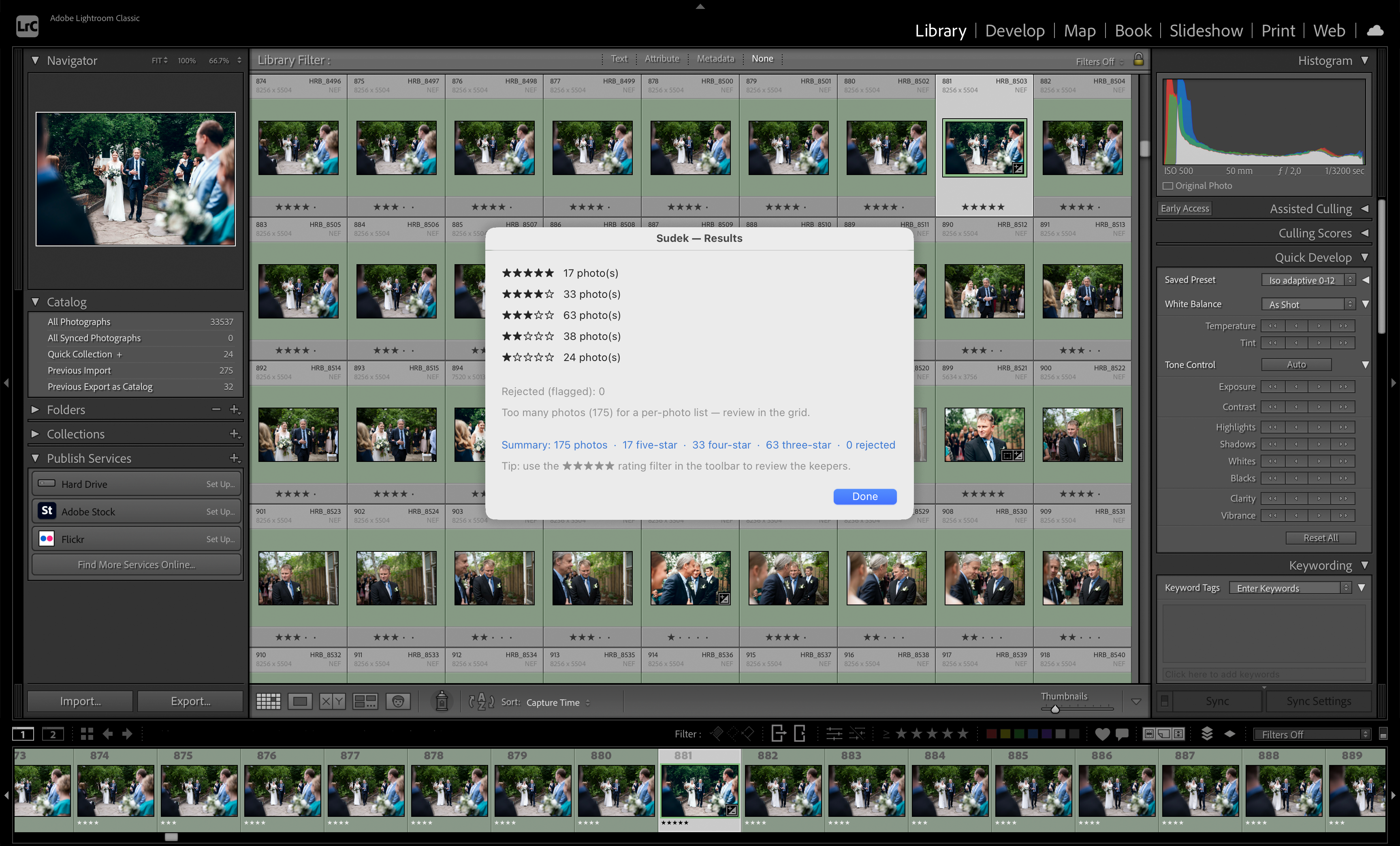
Sudek results in Lightroom Classic — 175 photos rated 1–5 stars automatically
3,000+
photos per shoot
1–5 ★
star ratings in Lightroom
$1–15
API cost per 1,000 photos
$99
one-time license fee
How it works

Three steps.
Minutes, not hours.

1
1

Select your photos

In Lightroom Classic, select a shoot or folder and launch Sudek from the Plug-in Extras menu. No export, no manual prep needed.

2
2

AI does the work

Sudek detects bursts and near-duplicates, strips closed eyes, blur, and bad exposures locally, then sends only the meaningful candidates to Claude — which picks one winner per group.

3
3

Star ratings appear

Results are written back to Lightroom automatically. Filter by 4–5 stars and start editing — your keepers are already sorted.

What Sudek sees

More than
blur detection.

Most culling tools check sharpness. Sudek understands the moment — and follows your rules.

One top pick per group

Every burst and near-duplicate sequence is grouped on your Mac. Claude compares the candidates and picks exactly one winner — the best frame, guaranteed.

🗑

Garbage removal

Closed eyes, severe motion blur, bad exposure — filtered locally before any data leaves your Mac. Less noise for the AI, lower API costs for you.

🎛

Presets & scoring rules

Create presets per shoot type. Reward sharp eyes and genuine smiles; penalize blinks, grimaces, and motion blur. Your standards, applied consistently to every frame.

✍️

Custom prompts

Each preset includes a free-text instruction to Claude. "The couple must always be in focus" or "prefer candid over posed." Plain language, precisely followed.

🤖

Claude AI judgment

Candidates and their scores go to Claude, which makes the final comparative pick — the same AI used in serious professional tools.

🎚

Model choice & cost control

Use fast, cheap Haiku for routine shoots or upgrade to Sonnet or Opus for weddings where every frame counts. You pay Anthropic directly — Sudek never marks up your API costs.

Trial & pricing

Try it free.
Buy when convinced.

Download and try Sudek free — no license required. You'll need your own Anthropic API key to run the AI (free to create, pay only for what you use). The trial limits each session to 100 photos.

Free trial
$0
Photos per session
Up to 100
AI model
Claude Opus
Batch API (faster & cheaper)
2 Mac activations
Free software updates
$99
one-time license fee
API costs billed by Anthropic
Buy Sudek or try free →

License key delivered instantly. Activate on up to 2 Macs.

Free trial
$0
Per session100 photos
AI modelOpus
Batch API
2 Macs
Updates
Licensed
$99 fee
Per sessionUnlimited
AI modelYour choice
Batch API
2 Macs
Updates✓ v1.x
$99
one-time license · API costs billed by Anthropic
Buy Sudek or download free trial →
Requirements

What you need.

🍎

Apple Silicon Mac

macOS 12 or later. Requires M1 chip or newer (M2, M3, M4). Intel Macs are not supported in v1.

📷

Lightroom Classic

Adobe Lightroom Classic (not Lightroom CC). Any recent version. The plugin installs in under a minute.

🔑

Anthropic API key

A free account at platform.anthropic.com. Add a payment method and generate a key. You pay Anthropic directly — typically $1–15 per 1,000 photos. Sudek never marks up your API costs.

Install guide

Up and running
in 10 minutes.

1

Download Sudek

Use the Download free trial button on this page, or — after purchasing — use the download link in your confirmation email. Unzip the file: you'll find Sudek Server.app and the Sudek.lrplugin folder inside. The trial and licensed versions are the same app; your license key unlocks full features.

2

Move Sudek Server to Applications

Drag Sudek Server.app to your /Applications folder. Open it — the Sudek icon appears in your Mac menu bar.

3

Enable "Launch at login"

Click the Sudek icon in the menu bar and turn on Launch at login. Sudek starts automatically from now on.

4

Install the Lightroom plugin

In Lightroom Classic, go to File → Plug-in Manager → Add and select the Sudek.lrplugin folder. Click Done.

5

Get your Anthropic API key

Go to platform.anthropic.com, create a free account, add a payment method, and generate an API key. The key looks like sk-ant-api03-…

6

Enter your API key in Sudek

In Lightroom, go to Library → Plug-in Extras → Sudek → Settings and paste your key. Stored securely in your Mac's Keychain — never leaves your machine.

7

Run your first cull

Select photos in Lightroom, go to Library → Plug-in Extras → Sudek → Cull selected. Watch the ratings appear.

FAQ

Common questions.

Why is there both a plugin and a separate app?
Lightroom Classic plugins can only do so much on their own — they can't run heavy AI models or make web requests directly. Sudek Server is a small background app that runs on your Mac and does the actual work: analyzing photos, communicating with the Anthropic API, and sending results back. The Lightroom plugin is the interface you interact with inside Lightroom. Both pieces are included in the same download and need to be running at the same time.
What is an Anthropic API key and how much does it cost?
A key that lets Sudek send photo previews to Claude AI on your behalf. Create one free at platform.anthropic.com — you'll need a credit card. You're billed only for what you use: $1–15 per 1,000 photos depending on model. The default (Haiku) is cheapest; Opus produces the strongest results. Sudek never handles or marks up these costs.
Can I control how Sudek culls — or is it a black box?
Full control through presets. Create a preset for each shoot type, set criteria weights (expression vs. sharpness, group vs. individual), and add a plain-language prompt. "Prefer candid moments" or "the couple should always be sharp." Sudek culls to your standard, not a generic one.
Are my photos uploaded to the cloud?
JPEG previews are sent to Claude for analysis — you control the preview resolution in Sudek's settings. Your original RAW files never leave your Mac. Anthropic's privacy policy applies to the preview data.
Does it work on Intel Macs or Windows?
Intel Mac support is not planned — those machines are largely out of active professional use. A Windows version is on the roadmap; let us know if that's a priority for you.
Which version of Lightroom does it support?
Lightroom Classic only — the desktop version included with Adobe Creative Cloud. Lightroom (cloud-based / CC) is not supported.
How do I update Sudek?
Download the new version from this page, unzip, and replace the app in /Applications. Your license key and settings carry over automatically. You'll be notified by email when updates are available.
What does "free software updates within v1.x" mean?
Pay once and receive all v1.x software improvements at no cost. Your Anthropic API usage is always billed separately by Anthropic, regardless of version. A future v2.0 with significant new capabilities will be a separate paid upgrade — existing customers get a discount.
What if the results don't match my culling style?
Tune your preset — adjust criteria weights or refine your custom prompt, then re-cull. Star ratings are non-destructive in Lightroom. Most photographers dial in their preset after 2–3 test shoots.
What is your refund policy?
We offer a full refund within 14 days of purchase, no questions asked. Since a free trial is available before buying, refund requests after 14 days are considered case by case. Contact support@sudekphotoculling.com and we'll sort it out.
How can I reach you?
Email support@sudekphotoculling.com for any questions about licensing, installation, or the product. We aim to reply within one business day.
Get Sudek

Stop spending
evenings culling.

$99

one-time license fee — API costs billed separately by Anthropic

  • Unlimited photos per cull
  • Weddings, events, portraits and more
  • Presets with your own culling criteria
  • Free software updates within v1.x
  • 2 Mac activations
  • License key delivered instantly
Buy Sudek — $99

Requires Anthropic API key · Apple Silicon Mac · Lightroom Classic

Not ready yet? Download the free trial →